Understanding Projector Screen Burn: What Is It?
The term projector screen burn might sound intimidating, conjuring images of cathode ray tube (CRT) monitors or plasma TVs suffering from permanent image retention. While screen burn on a projector surface is fundamentally different from electronic screen burn-in, the resulting damage is equally frustrating: a permanently discolored or degraded area that compromises image quality. For projection enthusiasts, understanding the true causes of projector screen burn is the first step toward effective prevention and maintaining a pristine viewing experience.
Unlike electronic displays where pixels degrade due to static images, damage to a projection screen is almost always physical or chemical degradation of the material itself. This degradation typically manifests as yellowing, brown spots, or a noticeable change in reflectivity in specific areas. The good news is that recognizing the source of the damage makes mitigation straightforward, often involving environmental control rather than complex equipment repair.
The Primary Causes of Projector Screen Damage
When users report projector screen burn, they are usually referring to one of two distinct issues: UV degradation from sunlight or chemical damage from heat and environmental factors. It is crucial to correctly identify the source of the problem to implement the right solution.
The Role of Sunlight: The Most Common Culprit
The single biggest threat to any projection screen, especially those installed near windows or used outdoors, is exposure to direct or indirect sunlight. This is the primary mechanism behind what is commonly called projector screen burn.
UV Degradation and Material Breakdown
Projection screens are typically made from vinyl, PVC, fiberglass, or specialized optical coatings. These materials, particularly the white or grey reflective layers, are highly susceptible to ultraviolet (UV) radiation. Prolonged exposure to sunlight causes a chemical reaction known as photodegradation. This breaks down the molecular structure of the screen material, resulting in:
- Yellowing or Browning: The white material oxidizes, leading to a permanent yellow or brown tint. This significantly alters color accuracy and reduces overall brightness.
- Brittleness: The screen material can become brittle and prone to cracking or tearing, especially if it is a retractable model that is frequently rolled up and down.
- Loss of Gain: The specialized reflective properties (gain) of the screen surface diminish, making the projected image appear dimmer and less vibrant.
If you notice discoloration that seems to follow the path of a sunbeam hitting the screen during the day, you are almost certainly dealing with UV-induced projector screen burn.
Heat Exposure and Material Degradation
While UV rays are the main cause, excessive heat can also contribute to screen damage, particularly in specific scenarios.
Projector Hot Spots and Misaligned Optics
Modern projectors, especially high-brightness models, generate intense heat. If the projector lens is placed too close to the screen, or if the internal optics are misaligned, a concentrated beam of heat energy might hit a small area of the screen. This can cause the material to warp, bubble, or develop a permanent “hot spot” where the reflectivity is visibly uneven. This type of damage is often misdiagnosed as true projector screen burn but is actually heat deformation.
Environmental Heat Traps
Screens installed in enclosed outdoor spaces (like sunrooms or screened porches) can suffer damage even without direct sunlight. High ambient temperatures, especially when combined with high humidity, can cause tensioned screens to stretch or materials to degrade prematurely. This accelerates the chemical processes that lead to discoloration.
Diagnosing and Identifying Screen Damage
Before attempting any repair or replacement, it is essential to confirm that the issue is indeed projector screen burn and not a projector malfunction (like a dying bulb or color wheel issue).
Visual Symptoms of Screen Degradation
True screen damage presents specific visual cues that persist regardless of the content being displayed or the projector being used.
Discoloration and Yellowing
The most common sign of UV damage is permanent yellowing or browning. To check for this:
- Turn the projector off.
- Look at the screen in natural daylight.
- If the affected area is visibly different from the rest of the screen (e.g., yellow, brown, or dull gray), the screen material itself is damaged.
Permanent Hot Spots or Dark Spots
If the damage is caused by heat deformation or chemical reaction, you might see localized blemishes:
- Dark Spots: Areas where the reflective coating has flaked off or chemically reacted, absorbing more light instead of reflecting it.
- Bubbling or Warping: Especially common on fixed or tensioned vinyl screens, where heat has caused the material to stretch or pull away from the frame unevenly.
Prevention Strategies: Protecting Your Investment
Preventing projector screen burn is far easier and cheaper than attempting a repair or purchasing a replacement. Prevention primarily revolves around shielding the screen from its greatest enemy: UV light.
Proper Storage and Shielding
If you have a manual or motorized retractable screen, always retract it when not in use. This simple action shields the delicate surface from ambient light and dust. For fixed screens, prevention requires more active measures:
- Blackout Curtains: Install high-quality blackout curtains or blinds on any windows that allow light to hit the screen, even indirectly. Ensure these are used religiously during daylight hours.
- Protective Covers: If the screen is installed in a semi-permanent location (like an outdoor patio), consider using a custom-fitted, opaque screen cover when the setup is dormant.
- Relocation: If possible, move the screen installation to a wall that receives no direct sunlight at any point during the day.
Choosing the Right Screen Material
When purchasing a new screen, especially for areas where sunlight exposure is unavoidable, prioritize materials known for durability and light rejection:
High-Contrast Grey and ALR Screens
Ambient Light Rejecting (ALR) screens or high-contrast grey screens are specifically engineered to reject light coming from angles other than the projector (like ceiling light or ambient window light). While they are primarily designed to improve image contrast, many modern ALR materials also feature enhanced UV stability, making them more resistant to projector screen burn caused by accidental sun exposure.
Screen Gain Considerations
Screens with very high gain (designed to maximize brightness) often achieve this through highly specialized, delicate coatings. These coatings can sometimes be more susceptible to environmental damage. For general use, a screen with a moderate gain (1.0 to 1.3) made from durable PVC or vinyl will often offer better longevity and resistance to degradation than ultra-high-gain materials.
Can Projector Screen Burn Be Fixed? Repair vs. Replacement
Once true projector screen burn (permanent discoloration or material degradation) occurs, the options for fixing it are extremely limited. Unlike minor scuffs or dirt, chemical damage cannot typically be reversed.
DIY Cleaning and Minor Repairs
If the discoloration is mild and localized, first confirm it is not just dirt or residue. Gentle cleaning might help:
- Use a soft microfiber cloth and distilled water.
- For stubborn spots, use a very mild soap solution (diluted dish soap) applied sparingly to the cloth, never directly to the screen.
- Always test a small, inconspicuous area first.
Warning: Never use harsh chemical cleaners, abrasives, or solvents. These will instantly strip the reflective coating and cause irreparable damage, accelerating the appearance of projector screen burn.
When to Opt for Full Replacement
If the damage is extensive—large areas of yellowing, visible bubbling, or a major loss of uniformity—replacement is the only viable option. Attempting to repaint or recoat a projection surface rarely yields satisfactory results, as the precise reflective properties needed for optimal image quality are lost.
Head-to-Head Comparison: Durable and Affordable Projection Screens
When selecting a new screen, especially if you anticipate exposure to the elements or frequent setup/takedown, durability and value are key factors in mitigating the risk and impact of future projector screen burn. We compare two popular 120-inch portable screens that offer different approaches to longevity.
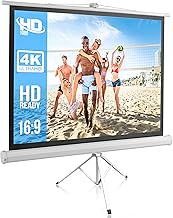
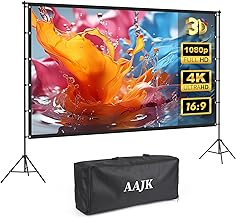
Product A: Outdoor-Projector-Screen-with-Stand (Durability Focus)
This screen is designed with outdoor use in mind, implying a certain level of robustness against environmental factors, which is critical for minimizing the risk of projector screen burn from light exposure.
The 120-inch screen comes with a dedicated stand, suggesting a more stable setup than simple hanging screens. Stability is important because screen flapping in the wind can cause stress and micro-tears, making the surface more vulnerable to environmental damage.
The inclusion of a stand also makes deployment easier and safer, reducing the chances of accidentally dragging the screen material across abrasive surfaces during setup, which can lead to scuffing that mimics early-stage screen damage.
Key Features:
- 120-inch 16:9 4K HD projection surface.
- Includes a stable stand, suitable for outdoor/backyard use.
- Lightweight and comes with a carry bag for easy transport and storage (crucial for protection).
Affiliate Integration (Product A):

This model is ideal if your primary concern is setting up a temporary outdoor theater where some light exposure might occur. The dedicated stand and focus on portability mean the screen can be quickly stored away, actively preventing long-term UV exposure and projector screen burn.
Product B: Mdbebbron 120 inch Foldable Anti-Crease Projection Screen (Value Focus)
The Mdbebbron screen represents the high-value, highly portable end of the market. While it lacks a dedicated stand, its focus on being foldable and anti-crease suggests a resilient material that can handle frequent packing and unpacking without developing permanent wrinkles, which can often look like uneven reflectivity or mild screen burn.
The main advantage here, in the context of screen degradation, is the low cost. If a screen is permanently damaged by accidental sun exposure or heat (true projector screen burn), replacing a budget-friendly screen is far less painful than replacing a premium model. This screen is highly suitable for indoor use or controlled outdoor environments where it can be quickly deployed and removed.
Key Features:
- 120-inch 16:9 surface.
- Highly portable and foldable anti-crease material.
- Support for double-sided projection.
- Extremely budget-friendly.
Affiliate Integration (Product B):
For users prioritizing cost-effectiveness and ease of storage, this model offers a great solution. While it may not have the built-in stability of a screen with a stand, its low barrier to entry makes it an easy replacement option should irreversible projector screen burn occur.
Choosing Between Durability and Value
When comparing the two, the choice depends on your usage environment:
- For Frequent Outdoor Use: The Outdoor-Projector-Screen-with-Stand offers better structural support and stability, which helps preserve the screen material over time, reducing wear and tear that could exacerbate vulnerability to light damage.
- For Controlled Indoor Use/Budget: The Mdbebbron Foldable Screen is an excellent value proposition. Its anti-crease properties ensure a smooth viewing surface, and its low price point makes it an inexpensive component to replace if accidental UV exposure leads to projector screen burn.
Advanced Measures Against Projector Screen Burn
Beyond basic storage and material selection, there are advanced steps serious home theater owners can take to ensure their screens remain flawless for years, mitigating all forms of projector screen burn.
Utilizing Motorized Screen Recess Systems
For permanent installations, consider a motorized screen that retracts fully into a ceiling or wall cassette. This completely eliminates ambient light exposure when the screen is not in use, offering the highest level of protection against UV degradation and dust accumulation.
Implementing Environmental Controls
In dedicated home theaters, managing the room environment is crucial. Extreme temperature fluctuations or high humidity can stress screen materials. Maintaining a stable, climate-controlled environment (around 68-75°F and moderate humidity) helps preserve the integrity of the reflective coatings and prevents warping or bubbling that can mimic screen burn.
Regular Projector Maintenance
Ensure your projector is well-maintained, particularly the cooling system and optics. Overheating projectors can sometimes cause light output to become unstable or generate excessive heat near the lens, increasing the risk of localized heat damage to the screen. Keeping the projector clean and properly ventilated ensures stable light output, protecting both the projector components and the screen surface from unnecessary stress.
Final Recommendations for Screen Longevity
The term projector screen burn is often used broadly to describe any permanent imperfection on the viewing surface. The reality is that for most modern screens, the damage is environmental (UV exposure) or physical (heat, abrasion), not electronic burn-in. To ensure maximum screen longevity and avoid costly replacements:
- Minimize Sunlight Exposure: This is the number one rule. Retract screens or use blackout curtains when not viewing.
- Handle with Care: Avoid touching the viewing surface. Oils and chemicals from hands can damage coatings and lead to permanent marks that resemble burn.
- Invest Wisely: If your screen is near windows or used outdoors, investing in a model designed for durability and easy, safe storage, like the Outdoor-Projector-Screen-with-Stand, is a proactive defense against projector screen burn.
By treating your screen as the delicate optical instrument it is, you can preserve its reflective properties and enjoy sharp, vibrant images for the lifetime of your projection system.